
Since Next Dispatch is primarily a desktop application, the design and functionality don’t need to be handled with a “mobile first” approach, but it should still be responsive for smaller screen sizes. This can be tricky in some ways because the full desktop application can be quite complex, and fitting all of that functionality into a smaller space can result in a cluttered, unintuitive, and difficult to use experience. For that reason, it can be very helpful to reduce the complexity of the page by altering or removing functionality. Let’s take a look at an example:
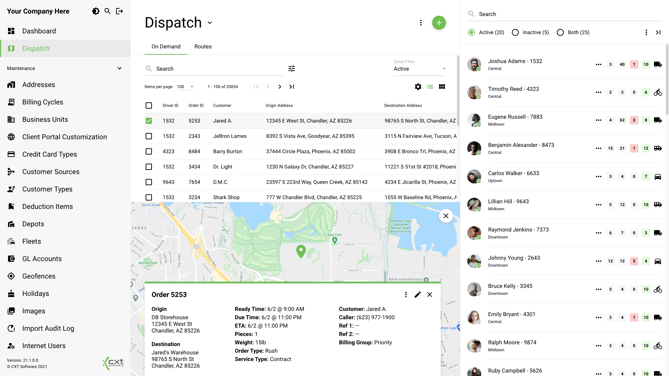

The image above is the desktop design for the Dispatch board in Next Dispatch. With all of the screen real estate available, the user can view panes for orders, drivers, a map, the order card preview, not to mention the main navigation and all sorts of other useful functionality on the page. Fitting all of this onto mobile would be a hassle and wouldn’t serve the majority of users. So, how can we provide a mobile dispatching page without breaking the bank?
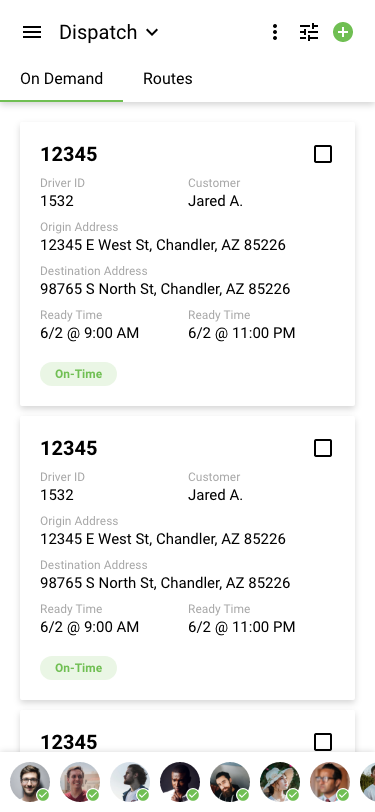

In this example, you can see a mobile version of the dispatch board that has been greatly simplified. This isn’t just a matter of adding some simple CSS breakpoints, but rather, implementing different UI components altogether based on the screen width. Instead of a page-sized panel for the drivers list, the drivers have been moved to a horizontal-scrolling bar fixed to the bottom of the screen. The dispatcher can still see which drivers are active/inactive and tap on orders and drivers to assign them, but to see more details about the driver, they would have to click on the driver to open a modal with their information. Another larger change is that all of the searching and filtering has been moved to a single icon in the header. Tapping on this icon could open a modal with the normal filtering options but with the default search bar there as well. This was done to save space on the screen so that a search bar didn’t need to be always present. There are many ways to solve these problems, and these are just some examples, but the idea is to reduce what is required for mobile to create a more consistent, user-friendly experience.
Media Breakpoints
The following media breakpoints can be used by the frontend team as breaking points for changes dependent on screen size. These can be helpful in ticket defining to clarify responsive details and avoid confusion:
|
Small-Down (mobile only) |
For screen sizes 600px and below |
|
|
Small-Up (not mobile) |
For screen sizes 601px and above |
|
|
Medium-Down (tablet and mobile) |
For screen sizes 1200px and below |
|
|
Medium-Up (tablet and desktop) |
For screen sizes 1201px and above |
|
|
Large-Down (not desktop) |
For screen sizes 1800px and below |
|
|
Large-Up (desktop only) |
For screen sizes 1801px and above |
|