When critical or blocker issues are identified that warrant customer systems to be patched, use the following standard practices to ensure customer systems get patched and all subsequent maintenance upgrades include the proper release files.
Workflow
-
Notify Staff and Leadership of the upcoming patch
-
Team members need to be updated, so they can properly handle incoming CSD tickets, prepare urgent customer communications (if necessary), etc
-
PLEASE NOTE: If the patch is due to regression test issues and is planned to be used for a scheduled release, all staff do not need to be notified. You will only need to notify the following teams- Engineering, SaaSOps, and Product.
-
-
-
Communicate with Engineering
-
Confirm that Engineering is prioritizing any development tickets that are needed for the patch
-
Get an ETA for when the developments will be ready for testing
-
-
Create a new release ticket in Jira with the following summary format “X Dispatch [Version] Release”
-
Example Ticket: XD-46280 that can be cloned and updated to the current patch information
-
Project = X Dispatch
-
Issue Type= Release
-
Fix Version
-
Add the fix version for the patch
-
Click on the “+ Create New Version” option if the fix version is not already present
-
-
Components
-
Add all applicable components to the field located in the scrollable section on the right side of the ticket
-
-
Labels
-
Add the “Patch” label to to the field located in the scrollable section on the right side of the ticket
-
-
Create filter for the patch fix version and add it to the release ticket
-
If you cloned the previous patch ticket, just update the existing filter with the new fix version
-
-
You can update the fix version in this filter and then click on the Share button to get the new link related to this patch and then add it to the Release ticket description
-
-
-
Create two (2) subtasks
-
Patch Release Prep - [Type the specific XD Fix Version]
-
Assign to the person coordinating the release
-
Currently this is being performed by Christy Cocchia-Barbaree
-
-
-
Patch Regression Test - [Type the specific XD Fix Version]
-
Assign to the QA team member that is performing the patch regression test prior to customer release
-
-
-
-
-
Add the required fix versions to any applicable XD tickets (Branch version and next Trunk version)
-
All tickets that need to be included within the patch need to have BOTH the branch and trunk versions added
-
EXAMPLE: If you are patching an issue within XD 25.2.2, you have to also add the XD 25.3.0 fix version since it is the next major release version
-
-
-
Create a SaasOps (DEVOPS) ticket and link it to the XD Release ticket
-
PLEASE NOTE: If the patch is for a scheduled release version, you do not need to create a SaaSOps (DEVOPS) ticket. They will need to be alerted of the incoming patch for 9906, but they will already have a ticket for the scheduled deployment of the new release to customers.
-
-
Project = DEVOPS
-
Issue Type = Task
-
Component = Cloud Instance Upgrade
-
-
Indicate on following information within the ticket description
-
What set of customers the patch is intended for: First Adopters or General Cloud
-
What internal instance they should deploy the patch to for internal testing prior to customer release (Internal Cloud Resource Use and Policy)t
-
9909 - General Cloud Production
-
9908 - First Adopter Production
-
9906 - First Adopter Pre-Production
-
-
What is the desired deployment date of the patch
-
-
Ping SaasOps within a ticket comment to alert them of the upcoming patch
-
-
Confirm all patch developments have been completed (Developed, Tested, Merged)
-
All tickets will need to be tested and merged into the branch and trunk versions by engineering prior to requesting a patch compile
-
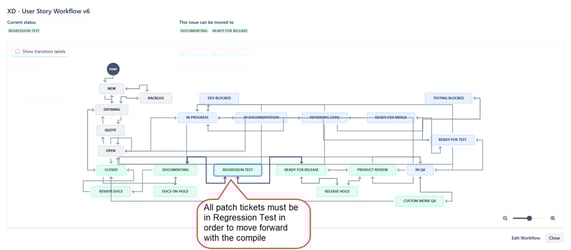
All tickets must be in the status of Regression Test in order to request a compile of the new version
-
-
-
-
Request Patch Compile
-
Change the status of the XD Release ticket to “Compile Release”
-
Assign the ticket to Derek Figg
-
This is the current assignee as of 04/09/2025
-
-
After compile, Derek currently alerts Christy and DevOps that the files are up on Azure Storage and can be patched to our internal instance for testing
-
Testing begins once SaasOps alerts QA that the internal instance has been updated to the patch version
-
-
Release Jira Version
-
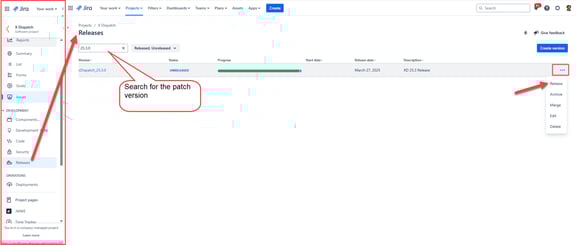
Navigate to “Releases” within the Jira left navigation of the XD project
-
Search for the patch release version
-
Click on the … Action menu and select “Release”
-
-
-
Internal Testing Environment Update by SaasOps
-
SaasOps notifies QA and Staff that internal instance has been patched via the OPS Google Chat
-
Once SaasOps notifies QA that the patch version has been updated on the specified internal instance, patch regression testing begins
-
-
Patch Testing
-
Update the XD Release ticket status to Testing
-
Assign the ticket to the QA team member that performs the regression
-
Notify QA through a ticket comment for historical record
-
Check in with QA team member via chat that they have seen the OPS chat message and confirm they have started the patch regression testing
-
-
Publish Package - QA Certifies or Fails the Patch Version
-
Version Certified (Passed Testing)
-
QA team member will ping DevOps, Product, Engineering, Marketing, and Documentation teams on a release ticket comment indicating whether the patch version has passed or failed testing
-
QA team member will log time for the testing onto the Patch Regression Testing [Version#] subtask and close it
-
QA team member will update the release ticket status from Testing to Publish Package and assign the ticket to the team member managing the release. (This is currently Christy Cocchia-Barbaree)
-
Release manager reviews the release ticket, confirms the patch was deployed to customers, logs any time, closes their Release Prep [Version#] subtask, and updates the status from Publish Package to Review Docs
-
-
Version Failures
-
If the patch version fails testing and a new patch version needs to be created, the status on the failed patch version’s release ticket gets moved from Testing to Newer Branch Version Available
-
This indicates that the patch was not deployed to customers
-
-
QA team member updates SaasOps, Product, Engineering, Documentation, and Marketing to alert them that the patch failed testing and will indicate the new patch version number that we will be shifting to.
-
-
-
SaasOps Deploys the Patch to Affected Customers
-
SaasOps team member updates the OPS Google Chat to alert all staff that the patch is being deployed.
-
Message will contain the patch version and what set of customers it will be deployed to
-
If the patch is part of a scheduled customer upgrade, the patch will go out as planned on the specified upgrade date
-
-
PLEASE NOTE:
-
Any patch versions previously deployed to First Adopters need to be added to Azure Storage so it can be automatically included by SaasOps when General Cloud gets upgraded to the version in the subsequent month. This ensures all customers get the appropriate fixes.
-
-
-
Review Documentation
-
Check in with Marketing and Documentation to see if they will be sending out a Release Blog for the patched version or if they will be updating the previous major release blog to include the additional patched items
-
-
Publish Package
-
Once all documentation and customer messaging is completed, update the status of the release ticket from Review Docs to Published
-