
Skip to content
English
  • There are no suggestions because the search field is empty.

How-to: CUS Ticket Escalation and Customer Communication

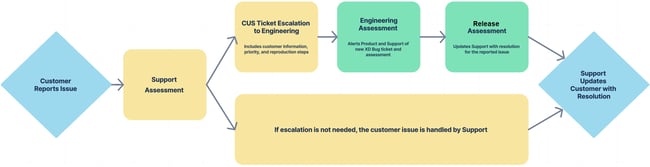
The following is a formalized workflow process for addressing customer-reported issues to ensure timely escalation from Support, assessment by Engineering and Product, and customer communication. 
64fcd793-92f4-4e18-82b9-1670cdc8e3cc

Workflow Steps

Overview

1. Customer Issue Reported to Support

Initial issue is reported to support via the support portal, phone call, or email.

2. Support Assessment

Support assesses the customer issue and determines whether the ticket can be handled within Support, Client Services, Engineering, or Product

If an issue is reported by a customer under the following circumstances, Support is to escalate the matter as soon as possible to Engineering via a CUS ticket

  • Any issue that seems to start occurring right after a scheduled upgrade or patch

  • Any financial issue (Rating or Driver Pay issue)

  • Any issue that looks to have a large customer impact

3. CUS Ticket Escalation to Engineering

If an issue needs to be escalated to Engineering for investigation, follow the guidelines on the CUS Ticket Checklist to ensure all necessary details are being included

Please prioritize entering high priority CUS tickets, so Engineering and Product can take action immediately. At times, we may be able to immediately stop additional customer upgrades until the issue is resolved so we reduce customer impact.

Please make sure to include the following information to Engineering on the CUS ticket:

  • Customer

  • Link the CSD ticket to the CUS ticket

  • Priority Level

  • Reproduction Steps

    • Screenshots and/or videos when available

4. Engineering Assessment

Engineering will review all information and perform an assessment on the following:

  • Cause

    • When the issue started

    • What ticket caused the issue

  • Severity

    • Is the application running?

    • Is it a financial bug?

    • What functionality is affected?

  • Impact

    • Does it affect all customers?

      • First Adopters

      • General Cloud

      • Both?

    • Is there a workaround?

Once the assessment is complete, Engineering will be responsible for the following:

  • Enter in an XD Bug ticket

    • Make sure to add the Customer and Priority from the CUS ticket

      • If the CUS ticket has a lower Priority level than what is assessed by Engineering, make sure to raise the Priority on the XD ticket so the severity of the issue is seen by Product

    • Assign bug ticket to the appropriate Engineering Dev Team

  • Enter a comment on the CUS ticket to alert the following team members of the XD bug ticket that has been entered

    • Original Reporter on the CUS ticket

    • Director of Product Engineering (Cem Sahin)

If the bug issue is high priority and needs to be assessed immediately for a patch, Engineering needs to also alert Product.

5. Release Assessment

Engineering will assess the Cause, Severity, and Impact of the bug and alert Product if necessary, but will be handled by Engineering based on the following three options:

  1. Patch

    1. If an issue is deemed severe enough, Product will work with Engineering to get the tickets quoted and brought into the current sprint so it can be included in an immediate patch.

  2. Next Customer Compile

    1. If the issue has impact on customers, but there is a easy workaround for the issue, Product will work with Engineering to get the ticket quoted and brought into the current sprint so it can be included in the next customer compile at the end of the month.

  3. Next Sprint

    1. If the issue has been a long-standing issue or has low impact on customers, Product will schedule the bug ticket for the next Sprint and Backlog Refinement (BLR) with Engineering for quote.

If the issue is deemed to have a large impact on customers, Marketing Department needs to be contacted with the details and impact of the issue, so they can put together customer messaging for affected customers.


Click to view the Open Bug List filter


Update Support (Original Reporter) on the CUS ticket with the following information, so they (Support) can properly update the customer on the original CSD ticket:

  • How the XD bug ticket will be handled/assigned to a sprint

    • Patch, Next Customer Compile, or Next Sprint

  • Tentative release version for the fix

    • Make sure to give TENTATIVE versions only for anything that has not already been deemed as an immediate patch


Move the CUS ticket to the “Postmortem” ticket status after the resolution information has been provided to Support, but will keep the ticket in that status until Support has confirmed the issue is resolved with the customer.

  • If Support comes back saying that the customer is not happy with the proposed resolution, Product may need to reassess the resolution


6. Customer Resolution

After receiving information from the Product Department, Support will update the customer on the original CSD ticket to let them know how their issue is being prioritized and fixed. Unless the issue is already deemed as a patch, please make sure to clearly state that fix versions are TENTATIVE.

Support will be responsible for updating Product on the linked CUS ticket when the issue has been resolved on the CSD ticket with the customer, so Product can then close out the CUS ticket in a timely manner.

  • If Support is leaving the CSD ticket open until the XD ticket is fully released to customers, please still alert Product once that has been established with the customer so they (Product) can close out the CUS ticket.

  • If Support responds that the issue is resolved with the customer, Product will move the ticket through Ready for Billing to Completed. This will close out the CUS ticket.

    • No data is required for the Ready for Billing status unless we are charging the customer for something, but that is not typically the case for this scenario.