
Open the XD Ticket Template
-
-
IMPORTANT NOTE FOR ALL STAFF
-
Do not update any values on the XD Ticket Template. All updates will be made on the cloned ticket that you will create from the default template.
-
-
Clone the Ticket Template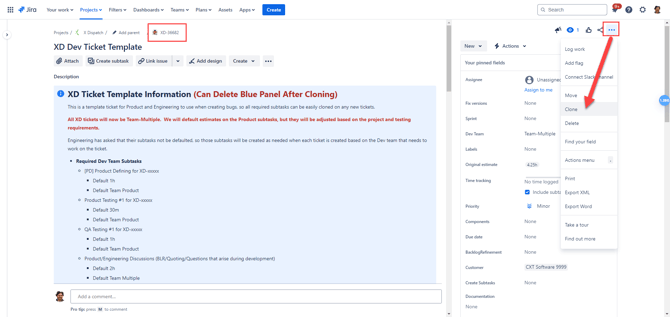
.png?width=670&height=318&name=63d5c8e9-83cd-4f49-b3b5-233775afbde1%20(1).png)
-
Go to the three-dot Action menu and select "Clone"
-
Update the ticket summary to relate to the new ticket that you are entering. Remove the word "CLONE" from the summary.
-
Enable the "Subtasks" checkbox, so all of the default subtasks get brought over to the newly cloned ticket
-
Select the "Clone" button to create the new ticket
Update Ticket Fields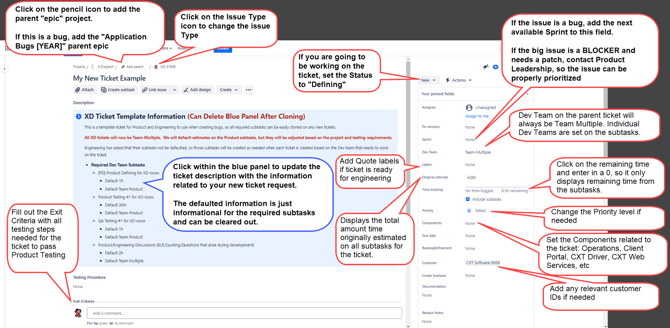
-
Issue Type
-
Defaults to Bug
-
Click on the Issue Type icon to change it to something else (Improvement, Story, Spike, etc)
-
-
Add Parent
-
Click on the pencil icon to add the parent "epic" project
-
If this is a bug, add the "Application Bugs [YEAR]" parent epic
-
-
Ticket Description
-
Click within the blue panel to update the ticket description with the information related to your new ticket request. The defaulted information is just informational for the required subtasks and can be cleared out.
-
Write out your ticket description based on the type of ticket you are entering
-
NOTE FOR PRODUCT
-
-
-
Status
-
If you are going to be working on the ticket right away, set the Status to "Defining"
-
-
Assignee
-
Leave blank for now
-
Tickets will be assigned to an engineer during sprint planning
-
-
Fix Version
-
Leave blank for now
-
Fix Versions are assigned after the development is completed by Engineering and testing by Product
-
There are some cases where a fix version will be assigned in advanced, but that is mostly when there will be an immediate patch of a major issue
-
-
-
Sprint
-
If the issue is a bug, add the next available Sprint to this field.
-
If the big issue is a BLOCKER and needs to be handled immediately through a patch or within the current sprint, contact Product Leadership so the issue can be properly prioritized
-
-
Dev Team
-
Dev Team on the parent ticket will always be Team-Multiple
-
Individual Dev Teams are set on the subtasks (Team Web, Team Web Service, Team XD, Team Int&Cus, Team Product, etc)
-
-
Labels
-
If ticket is ready for quote from engineering, add one of the quote labels to the ticket
-
WebBLR_Quote(Active/Queue/Complete)
-
WSBLR_Quote(Active/Queue/Complete)
-
XDBLR_Quote(Active/Queue/Complete)
-
-
If a ticket needs to be assessed at the next BLR with priority, add the following Label to the ticket:
-
BLR_Priority
-
-
-
Original Estimate
-
Needs to display the total amount time originally estimated on all subtasks for the ticket
-
This will need to be updated if you adjust any of the defaulted estimates on the subtasks, but then checked again before moving the ticket from Quote to Open to make sure the engineering subtask estimates have been added.
-
-
Time Tracking: Remaining Estimate
-
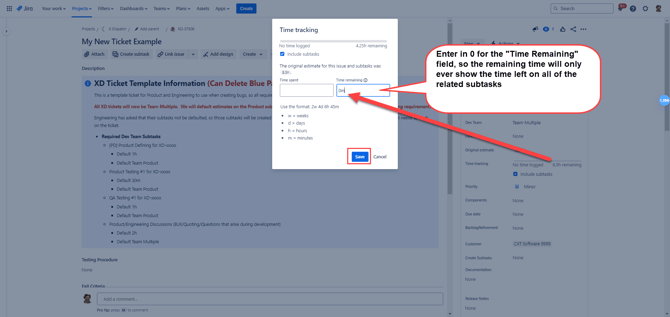
Click on the remaining time displayed on the parent ticket and you will see the Time Tracking pop up modal
-
Enter 0 into the Time Remaining field, so the parent ticket only displays the total amount of remaining estimate time from all of the subtasks
-
-
Priority
-
Defaults to Minor
-
Change the Priority level if needed
-
Blocker
-
Critical
-
Major
-
Minor
-
Trivial
-
-
-
Components
-
Set the engineering components related to the ticket
-
Operations
-
Client Portal
-
CXT Driver
-
CXT Web Services
-
-
-
Backlog Refinement
-
For Product Use
-
Add the date that you set the ticket Status to Quote and added the Quote BLR Labels
-
-
Customer
-
If the project is related to a customer-specific request, add any applicable customer IDs to the project, so we know who is asking for the development
-
-
Exit Criteria
-
Enter in the exact testing steps that need to be followed in order for the ticket to pass testing. Please be as specific as possible and include all of the various workflows that need to be tested.
-
See the Example Test Cases written by Mohammad to assist with how to format your testing tests
-
Update Ticket Subtask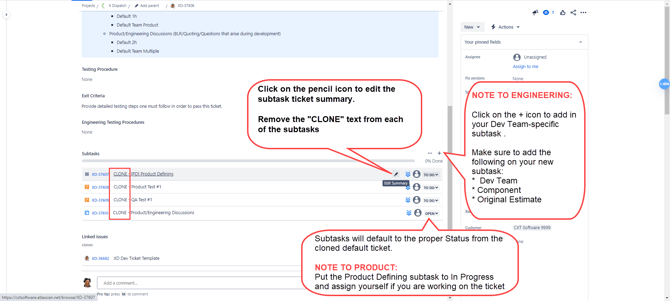
-
Edit the Subtask Ticket Summaries
-
Click on the pencil icon to edit the subtask ticket summary
-
Remove the "CLONE" text from each of the subtasks
-
-
NOTES FOR ENGINEERING ONLY (If creating the Engineering subtask at the time of ticket entry)
-
Click on the + icon to add in your Dev Team-specific subtask
-
Issue Type
-
Technical Task
-
-
Subtask Summary
-
Summary should can be generalized with the following unless specific app names need to be specified. Please always note the [ DEV TEAM ].
-
[ FE ] Do the work
-
[ BE ] Do the work
-
[ XD ] Do the work
-
[ Int & Cus ] Do the work
-
-
-
Dev Team
-
Select your Dev Team
-
Team Web
-
Team Web Service
-
Team XD
-
Team Int & Cus
-
-
-
Component
-
Select the application name/functionality that the ticket refers to
-
Operations App
-
Client Portal
-
CXT Driver
-
CXT:WebService
-
SQL
-
Etc
-
-
-
Original Estimate
-
This is the the estimated time that you think it will take to finish the work on this subtask
-
-
-
NOTES FOR PRODUCT ONLY
-
The following fields and statuses are defaulted on the product subtasks already with the cloning action (Subtasks checkbox had to be checked when cloning), but please update the Original Estimate time values if you think the project requires more or less time than what is defaulted
-
If you are defining the ticket right away, put the Product Defining subtask to the In Progress status and assign yourself to the ticket
-
Issue Type / Summary / Component
-
Product Defining / Product Defining / Product Defining
-
Product Test / [ PD ] Product Testing #1 / Product Testing
-
QA Test / QA Testing #1 / QA Testing
-
Internal Meeting / Product/Engineering Discussions / No Component Needed
-
-
Dev Team
-
Team Product
-
-
Original Estimate
-
Varies depending on the subtask issue type
-
Check the defaulted value and update the value based on the specific project if needed or leave at the default value
-
-
-
Moving Ticket to Quote
-
Check over the ticket and confirm the following:
-
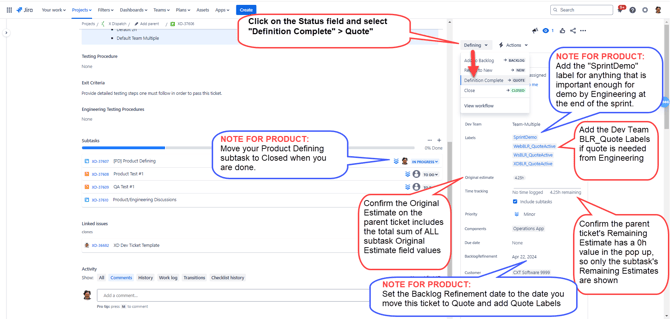
Confirm the Original Estimate on the parent ticket includes the total sum of ALL subtask Original Estimate field values
-
Keep in mind that Engineering may still have to create and quote their subtasks, so just update what you can at this point based on the existing subtasks
-
-
Confirm the Remaining Estimate on the parent ticket has a 0h value in the Time Estimate pop up (Click on the time to see the pop up), so only the subtask's Remaining Estimate sum is shown
-
Add the Dev Team BLR_Quote Labels if quote is needed from Engineering
-
NOTES FOR PRODUCT
-
Move your Product Defining subtask to Closed
-
Add the "SprintDemo" label for anything that is important enough for demo by Engineering at the end of the sprint
-
Set the Backlog Refinement date to the date you move this ticket to Quote and add Quote Labels
-
-
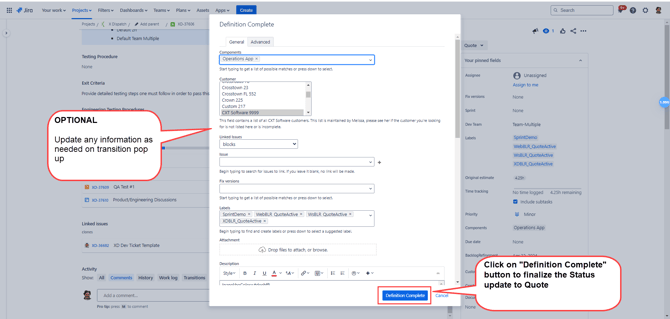
Click on the Status field and select "Definition Complete" > Quote"
-
Click on “Definition Complete” button to finalize the status update
-
Engineering Quotes/Moving Ticket to Open
-
NOTES FOR ENGINEERING:
-
The tickets will now be in the Engineering queue for quotes. Quotes are obtained from Engineering from the following methods:
-
Scheduled Backlog Refinement Meetings (BLRs) between Product and Engineering
-
Internal Engineering team meetings (scheduled at the discretion of Engineering management)
-
-
-
Create their dev-specific subtasks
-
See the “NOTES FOR ENGINEERING ONLY” under the “Update Ticket Subtasks” section above for more information
-
-
Add quote to their dev-specific subtasks
-
Leave Status in Open
-
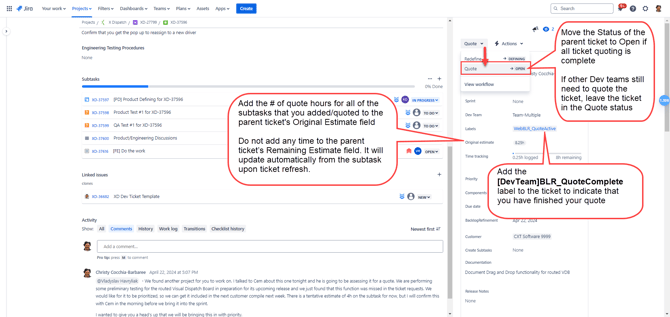
Add the # of quote hours for all of the subtasks that you added/quoted to the parent ticket's Original Estimate field
-
Do not add any time to the parent ticket’s Remaining Estimate field. It will update automatically from the subtask upon ticket refresh.
-
-
Add the “[DevTeam]BLR_QuoteComplete” label to the ticket to indicate that you have finished your quote
-
WebBLR_QuoteComplete
-
WSBLR_QuoteComplete
-
XDBLR_QuoteComplete
-
-
Move the Status of the parent ticket to Open if all ticket quoting is complete
-
If other Dev teams still need to quote the ticket, leave the ticket in the Quote status
-